The Yealink T5 series includes premium business IP desk phones designed for professionals handling moderate to high call volumes. These devices offer HD audio, large colour displays, advanced wireless connectivity, and programmable line keys.
Supported Models & Firmware
The following Yealink T5 series models are supported. Ensure devices are running the required firmware version where applicable:
- T53 / T53W — Requires firmware 95.84.0.10 or later
- T54W — Requires firmware 96.84.0.10 or later
-
T54 — Requires firmware XX.83.0.30 or later (excluding XX.84.0.10)
Note: “XX” represents the fixed number specific to each device model. - T57W — Requires firmware 97.84.0.30 or later
Key Features
- Colour Displays — Large, high-resolution LCD screens for improved navigation and visibility.
- HD Audio with Acoustic Shield Technology — Reduces background noise for clearer conversations.
- Wireless Connectivity — Built-in Wi-Fi (W models) and optional Bluetooth or DECT handset support.
- Programmable Line Keys — Multiple line and feature keys for efficient call management.
- Gigabit Ethernet Ports — Dual network ports for high-speed connectivity.
- USB & Headset Support — RJ-9 headset port and USB connectivity for wired or wireless accessories.
- On-Device Conferencing — Supports multi-party conferencing directly from the desk phone.
Button Guide (T54W Layout Example)
The diagram below shows the typical layout of a Yealink T5 series desk phone. Button placement may vary slightly by model.
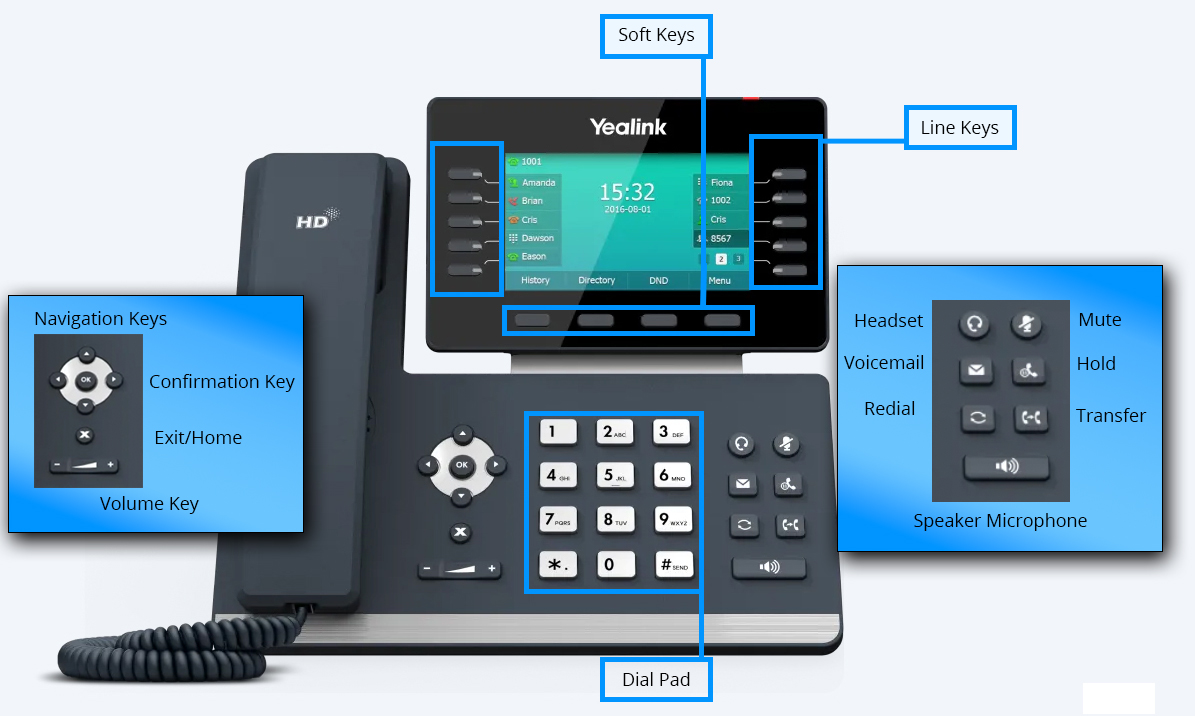
- Soft Keys — Context-sensitive buttons aligned with on-screen options.
- Line Keys — Select lines, monitor calls, or access assigned features.
- Navigator Key — Scroll and confirm menu selections.
- Mute Key — Toggle microphone audio on or off.
- Headset Key — Activate a connected headset.
- Voicemail Key — Access voicemail messages.
- Redial Key — Redial the most recently dialed number.
- Speaker Key — Enable or disable speakerphone mode.
- Volume Keys — Adjust ringer or speaker volume.
- Dial Pad — Standard 12-key keypad for dialing and character input.
Official Resources
For full technical specifications and additional documentation, refer to the official Yealink data sheets for your specific T5 series model.
